A practical tool stack for pre-seed, seed, and Series A teams that need search data, technical control, and content velocity before they build an SEO department.
Most early-stage startups do not need a full SEO suite. They need evidence. They need to know whether Google can crawl the site, whether search demand exists, which pages earn impressions, and whether organic traffic creates signups, trials, demos, or assisted revenue.
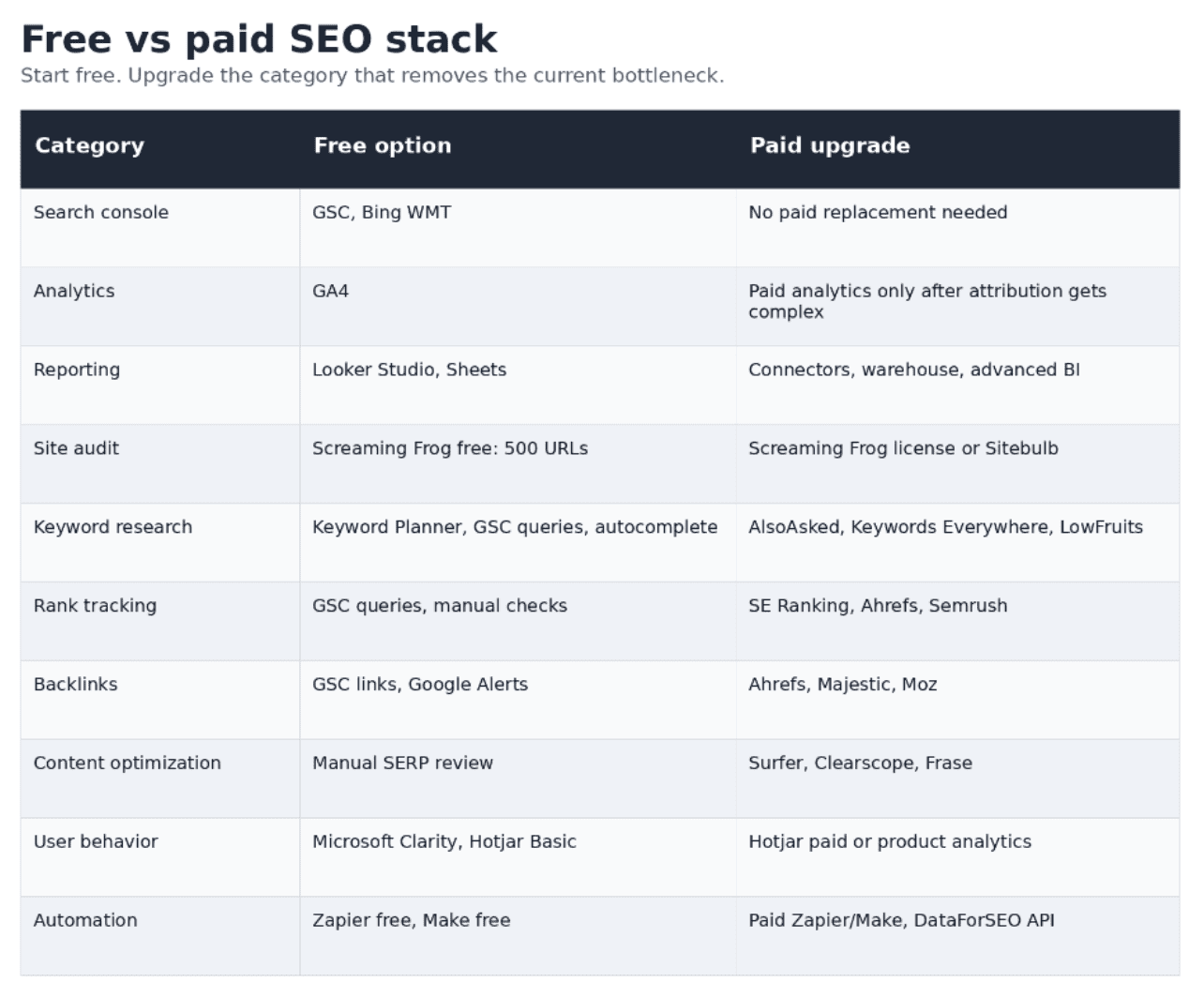
The lean stack does that work with free tools first, then adds paid tools only when a workflow breaks. A crawler enters before a full suite. A rank tracker enters after the site has enough pages to track. Content optimization enters after the team publishes often enough to save time. Link software enters after the team moves from passive monitoring to active outreach.
This article turns the source research into a startup-ready buying framework. It focuses on B2B and SaaS teams before the first SEO hire.
Executive summary
- Start with Google Search Console, GA4, Bing Webmaster Tools, Looker Studio, Google Sheets, PageSpeed Insights, Lighthouse, and Microsoft Clarity. This baseline costs $0 and covers search visibility, analytics, reporting, speed checks, and user behavior.
- Use Screaming Frog free while the site stays below 500 crawlable URLs. Buy the license when the 500-URL limit hides real technical issues or slows monthly audits.
- Use Google Keyword Planner, GSC queries, autocomplete, and manual SERP review before buying Ahrefs or Semrush. Add Keywords Everywhere, AlsoAsked, or LowFruits when the team needs faster long-tail research.
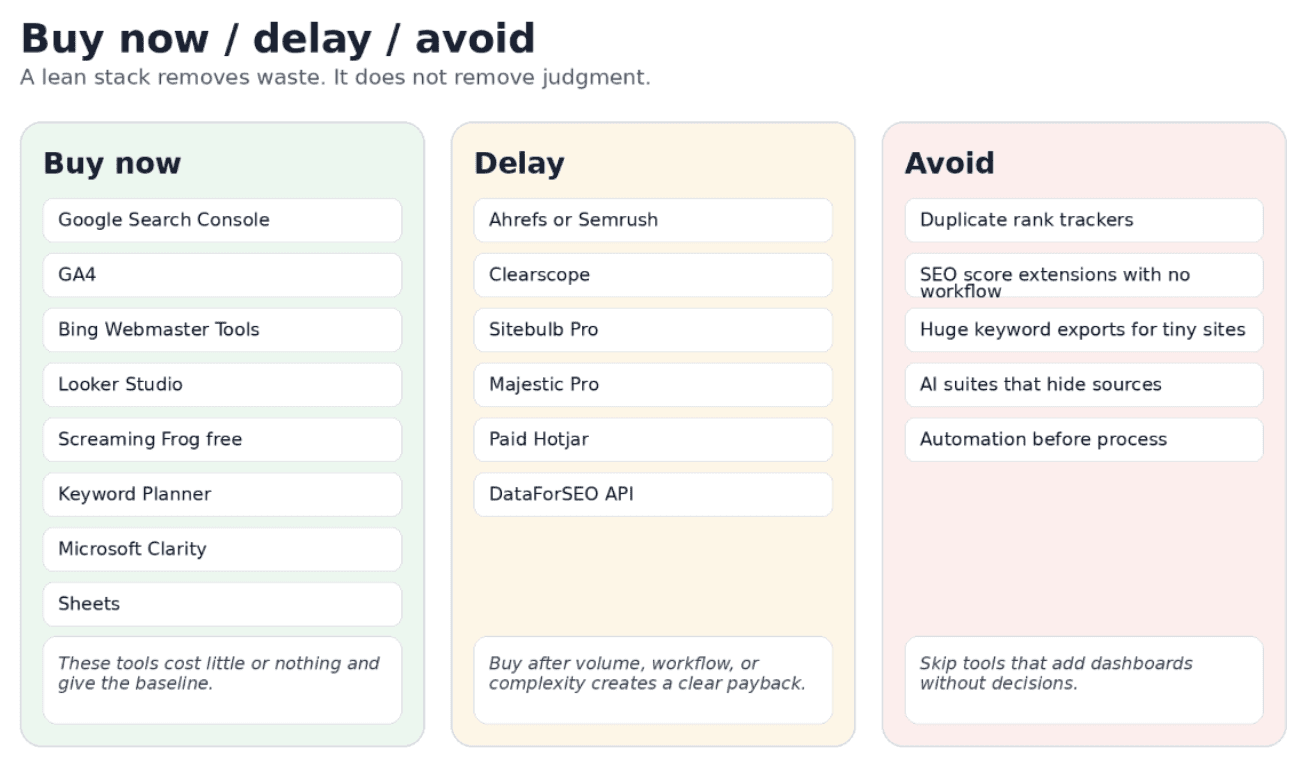
- Delay full suites until the site has enough content, rankings, and backlink movement to analyze. A $139-$249 monthly suite can waste budget when the site has ten pages and no repeatable SEO process.
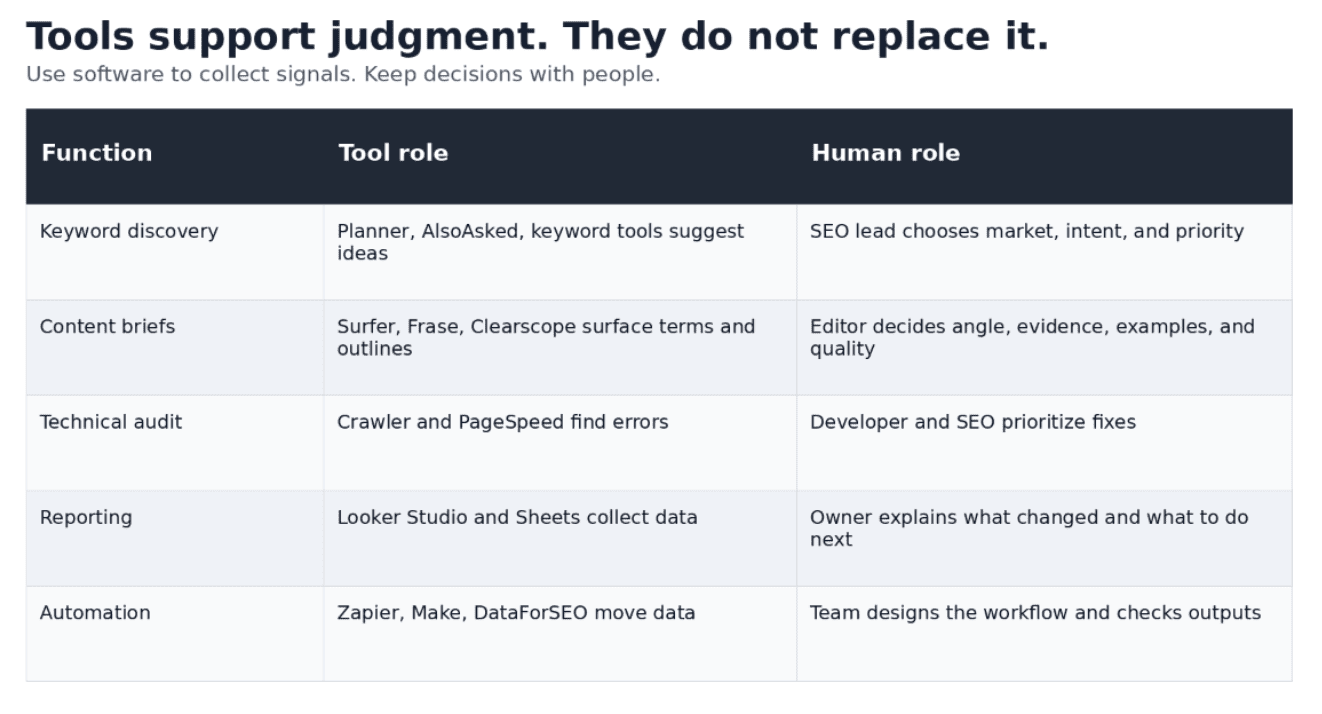
- Treat content tools as production tools, not strategy tools. Surfer, Clearscope, and Frase help brief and optimize articles. They do not decide product positioning, search intent, source quality, or editorial judgment.
- Hire the first SEO specialist when organic traffic affects pipeline, technical risk exceeds a generalist team, content demand outgrows the founder or marketer, or international/programmatic SEO enters the roadmap.
For startups that already publish content and start outreach, the link workflow deserves a separate buying decision. Backlink analysis, prospecting, outreach, placement tracking, and reporting use different tools. A compact comparison of link building tools can help a small team avoid buying a full SEO suite only to solve one link-building task.
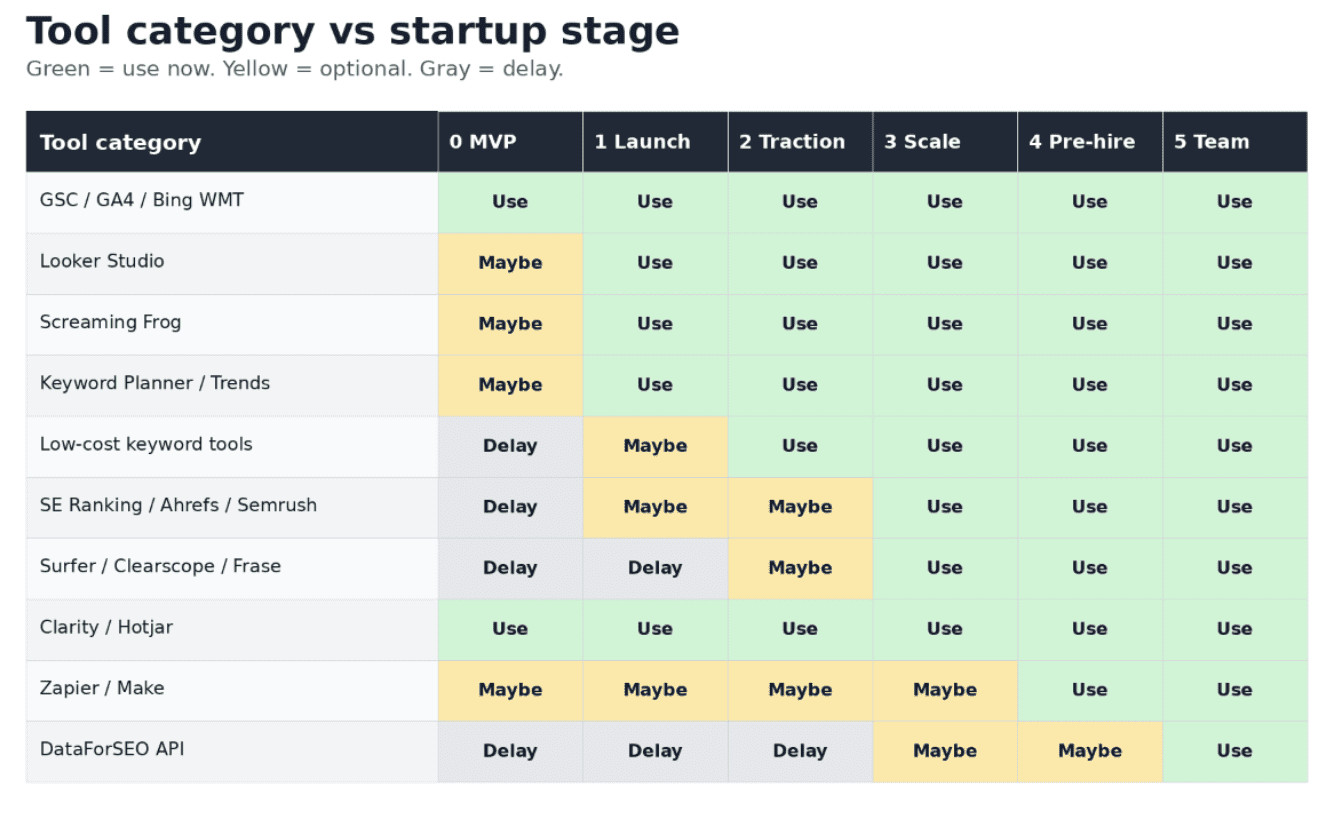
The stack should follow the startup stage
A startup does not need the same SEO stack at MVP, first traction, and Series A. The tool mix should follow three constraints: the number of pages, the number of SEO workflows, and the amount of organic revenue at risk.
What the lean stack must prove
Before a startup hires an SEO team, the stack must answer five concrete questions.
- Can search engines crawl, index, and render the site without blocked assets, noindex mistakes, redirect loops, or broken canonical logic?
- Do real queries produce impressions for product, category, and informational pages?
- Which pages create non-branded clicks, assisted conversions, signups, demos, or trials?
- Can the team publish and refresh content without losing technical quality?
- Does link demand justify a dedicated process, or can the team still monitor backlinks manually?
If a tool does not improve one of these answers, delay it. A startup does not need more dashboards. It needs fewer open questions.
Core tool categories
Search and index monitoring
Google Search Console should exist on day one. It shows impressions, clicks, CTR, average position, index status, sitemap problems, and crawl issues. Bing Webmaster Tools adds another free search console and can surface extra query data. Neither tool replaces SEO work, but both prevent guesswork.
Early use case: submit the sitemap, inspect the homepage and core landing pages, check index coverage after launch, and export queries every week. Do not buy a rank tracker before the site earns enough impressions to create a useful query sample.
Analytics and reporting
GA4 connects organic traffic to business outcomes. A startup should define conversion events before traffic grows: signup, trial start, demo request, pricing click, contact form submission, and newsletter signup. Looker Studio then turns GSC and GA4 data into a weekly view for founders.
Early use case: one dashboard with organic impressions, organic clicks, non-branded clicks, indexed pages, top pages, organic sessions, and conversions. Anything beyond that belongs in a later stage.
Technical SEO and crawling
Screaming Frog covers the first audit layer. Its free version crawls up to 500 URLs, enough for most MVP and early content sites. The license becomes useful when pagination, blog archives, faceted pages, localization, or programmatic pages push the site beyond that limit.
Sitebulb can help teams that need visual crawl reports and easier audit summaries. PageSpeed Insights and Lighthouse stay in the stack at every stage because speed, render blocking, and Core Web Vitals affect both search and conversion.
Keyword research and content planning
A founder can build the first keyword map without Ahrefs or Semrush. Start with product features, pain points, jobs-to-be-done, competitor category names, and customer language. Expand with Keyword Planner, autocomplete, People Also Ask data, and GSC queries after launch.
Low-cost tools enter when manual work becomes slow. Keywords Everywhere speeds volume checks. AlsoAsked helps build question clusters. LowFruits helps find long-tail opportunities with weaker SERPs. These tools support prioritization; they do not decide positioning.
Competitive and link data
Ahrefs, Semrush, Moz, SE Ranking, and Majestic solve different versions of the same problem: external search data. They show ranking estimates, competing pages, backlinks, keyword difficulty, and competitor movement. They become useful when the startup already has pages to compare and decisions to make.
Before that point, GSC, manual SERP checks, and a small keyword tracker can cover the work. For backlinks, GSC Links and Google Alerts can monitor basic movement. Paid link tools become worth the cost when outreach, digital PR, partnerships, or marketplace link acquisition become active workflows.
Content optimization
Surfer, Clearscope, and Frase help teams create briefs, compare SERP coverage, and check whether an article includes expected subtopics. They should not define quality. A high content score can still produce thin, repetitive, or misaligned copy. Use these tools after the team publishes enough content that brief preparation becomes a bottleneck.
Behavior analytics
Microsoft Clarity and Hotjar Basic give early UX evidence. Use session recordings and heatmaps on the homepage, product pages, pricing pages, and top content pages. These tools show whether users reach the CTA, scroll past product proof, or get stuck in navigation.
Automation and APIs
Zapier and Make should automate repetitive reporting only after the team has a stable reporting process. DataForSEO and similar APIs fit technical teams that build internal dashboards, SERP checks, or data pipelines. They are not a day-one SEO tool for a non-technical founder.
Budget-based stacks
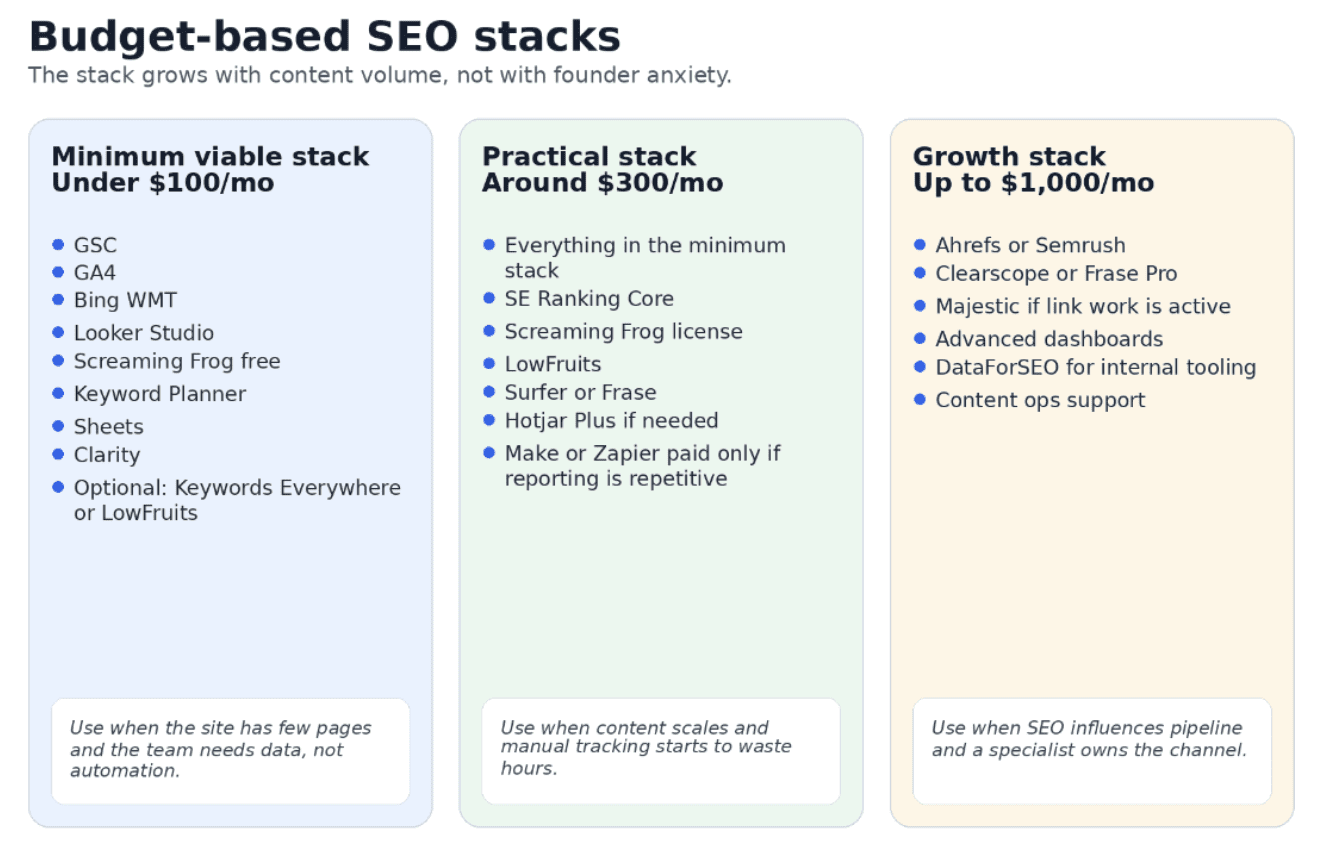
A budget limit forces better choices. The stack under $100 should prove search demand and technical health. The $300 stack should reduce manual work. The $1,000 stack should support a dedicated owner and a real revenue plan.
When each paid tool becomes worth buying
- Buy Screaming Frog license when the site exceeds 500 URLs or monthly audits need exports, custom extraction, API connections, or complete crawl data.
- Buy SE Ranking when the team tracks a stable keyword set and wants project-level rank movement without paying for a full suite.
- Buy Ahrefs or Semrush when competitor research, backlinks, keyword gaps, and content audits influence weekly decisions.
- Buy LowFruits, AlsoAsked, or Keywords Everywhere when manual keyword research blocks content production.
- Buy Surfer, Clearscope, or Frase when the team produces enough briefs that manual SERP analysis slows publishing.
- Buy paid Hotjar when Clarity and the free Hotjar tier no longer capture enough sessions or survey responses.
- Buy DataForSEO only when a technical owner can maintain API workflows and the team knows exactly which data it needs.
Practical workflows before the first SEO hire
1. First technical SEO setup
Owner: founder and developer. Time: 1-2 hours.
- Install GA4 and test the tag on every template.
- Create conversion events for signup, trial, demo, pricing click, and contact form submission.
- Verify the domain in Google Search Console and Bing Webmaster Tools.
- Submit the XML sitemap and inspect the homepage, product pages, pricing page, and first blog URLs.
- Run Screaming Frog free. Export 4xx pages, 5xx pages, redirect chains, canonical tags, title tags, meta descriptions, and noindex pages.
- Run PageSpeed Insights on the homepage, the highest-value landing page, and one article template.
- Create tickets for fixes. Assign technical problems to the developer and content problems to the marketer.
Mistake to avoid: do not ship a site where robots.txt, noindex tags, or canonical tags block the main pages. This error can hide SEO progress for weeks.
2. First keyword research workflow without Ahrefs or Semrush
Owner: founder or marketer. Time: 1-2 hours for the first keyword map.
- List 5-10 product terms from features, customer pain, category names, alternatives, and buying objections.
- Run the seed list through Google Keyword Planner. Export ideas and volume ranges.
- Use Google autocomplete and related searches to capture long-tail phrasing.
- Use AlsoAsked or People Also Ask data to capture question clusters.
- Manually inspect the SERP for each promising keyword. Label the intent: guide, comparison, category page, pricing page, tool list, template, or problem-solution article.
- Map one keyword group to one page. Do not assign five intents to one article.
- Pick the first 10 pages by business value, not by volume alone.
Output: a spreadsheet with keyword, intent, page type, priority, planned URL, owner, status, and expected conversion path.
3. Lean content brief workflow
Owner: content marketer or editor. Time: 30-60 minutes per article.
- Open the target SERP and identify the dominant format. If results show tool lists, do not brief a definition article.
- Open 3-5 ranking pages. Record H2s, H3s, evidence types, screenshots, comparison criteria, examples, and missing angles.
- Pull related queries from GSC if the site already has impressions.
- Write a brief with H1, search intent, reader problem, sections, examples, product angle, internal links, and proof requirements.
- Use Surfer, Clearscope, or Frase only as a check, not as the brief itself.
Mistake to avoid: do not build a brief from keyword density. Build it from intent, evidence, and the decision the reader must make.
4. Weekly SEO monitoring workflow
Owner: marketer. Time: 15-30 minutes per week after dashboard setup.
- Open the Looker Studio dashboard connected to GSC and GA4.
- Check weekly impressions, clicks, CTR, indexed pages, top pages, and organic conversions.
- Filter GSC queries by brand and non-brand. Record non-brand movement separately.
- Check pages with sudden drops in impressions or clicks.
- Add one short note: what changed, why it matters, and what the team will do next.
Mistake to avoid: do not react to daily noise. Use weekly and monthly windows unless a release, migration, or indexing issue created a clear event.
5. Monthly technical audit workflow
Owner: marketer plus developer. Time: 1-2 hours.
- Run a full crawl or a segmented crawl if the free version caps at 500 URLs.
- Check 4xx, 5xx, redirect chains, canonical conflicts, duplicate titles, missing headings, missing meta descriptions, noindex pages, and orphan-risk pages.
- Compare crawl output with GSC indexing data.
- Review Core Web Vitals and test key templates in PageSpeed Insights.
- Create a short fix list with severity, affected URLs, owner, and deadline.
6. Backlink monitoring workflow
Owner: marketer or consultant. Time: 10-20 minutes per week until active outreach starts.
- Check GSC Links for top linking sites and linked pages.
- Set Google Alerts for the brand, product name, founder names, and proprietary terms.
- Spot-check new domains for relevance, traffic, page quality, and link placement context.
- Use Ahrefs, Moz, or Majestic only when the team investigates lost links, prospect quality, competitor links, or outreach targets.
Mistake to avoid: do not report raw backlink count without relevance, referring domain quality, and target page value.
7. Content decay detection workflow
Owner: content marketer. Time: 30-60 minutes per month.
- Export page-level GSC data for the last 3 months and the previous period.
- Flag pages where clicks or impressions dropped by 30% or more.
- Check whether the drop matches seasonality, a SERP change, a site change, or outdated content.
- Refresh facts, examples, screenshots, prices, product references, internal links, and CTA placement.
- Record the update date and monitor the page after 2-4 weeks.
8. Founder and investor reporting workflow
Owner: marketer or growth lead. Time: 1 hour after the first template exists.
- Show organic impressions, organic clicks, non-branded clicks, indexed pages, top pages, organic conversions, and assisted conversions.
- Show the number of new pages published, refreshed pages, and fixed technical issues.
- Separate inputs from outcomes. Inputs are pages, fixes, links, and briefs. Outcomes are impressions, clicks, rankings, signups, demos, and pipeline.
- Write one decision paragraph: what to continue, what to stop, what to test next.
KPI framework before hiring an SEO team
Early SEO reporting should show progress before revenue volume arrives, but it must not hide weak acquisition. Use different KPIs at different maturity levels.
Useful early KPIs
- Indexed pages: the count should grow as the site ships pages. A flat count after launch can signal crawl or quality problems.
- Organic impressions: the first useful proof that Google has matched pages to queries.
- Organic clicks: the first traffic signal. Low clicks with rising impressions points to ranking or CTR work.
- CTR: useful when a page already earns impressions. Improve title, meta description, intent match, and SERP angle.
- Non-branded clicks: better proof of SEO progress than brand clicks.
- Share of pages with impressions: shows whether the content set has search exposure or dead pages.
- Crawl errors: treat new 4xx, 5xx, and excluded submitted pages as operational issues.
- Content velocity: track published and refreshed pages per month.
- Organic signups, demos, trials, and assisted conversions: the KPI that justifies the channel once traffic volume appears.
KPIs that mislead early teams
- Keyword rank movement for a tiny site. Moving from position 49 to 38 rarely changes the business.
- Domain Authority or Domain Rating as a weekly KPI. Use it for rough comparison, not operational decisions.
- Traffic without conversion context. A page can bring visits and still fail the business.
- Content optimization score. A score can improve while the article becomes less useful.
- Backlink count without relevance, traffic, and placement context.
Common mistakes and false economies
Buying Ahrefs or Semrush before the site has a process
A full suite gives more data than a small team can use. If the team has no weekly keyword review, no content cadence, and no link workflow, the suite becomes an expensive search box.
Tracking hundreds of keywords before publishing enough pages
Rank tracking needs stable targets. Track product, category, comparison, and priority content terms first. Add more only when the site has pages that can realistically rank.
Creating briefs without manual SERP review
Tools can summarize competing pages, but they can miss the real page type. A startup wastes articles when it writes a guide for a SERP that wants a comparison page, a tool list, or a pricing page.
Ignoring technical SEO until traffic drops
Broken canonicals, noindex tags, redirect chains, orphan pages, and slow templates can block growth before the team sees a traffic graph. Monthly crawls prevent that surprise.
Reporting traffic without conversions
Founders need revenue logic. A report that shows 10,000 visits without signups, demos, trials, or assisted pipeline hides channel quality.
Confusing optimization scores with quality
A score measures term coverage against a model. It does not prove accurate claims, product insight, original examples, or editorial value.
Over-automating before the process works
Automation should remove repeated work. It should not create a fragile system around a workflow the team has not validated.
When to hire the first SEO specialist
Tools can stretch a small team, but they do not remove the need for ownership. Hire when SEO becomes a business system, not a side task.
- Organic traffic contributes a meaningful share of signups, demos, trials, or assisted conversions.
- The roadmap includes technical risk: migration, new CMS, international rollout, programmatic pages, faceted navigation, or complex site architecture.
- Content demand exceeds founder or marketer capacity, and briefs, updates, internal links, and quality control start to slip.
- Reporting affects revenue planning and investor updates.
- The team already pays freelancers or consultants every month, but coordination and prioritization require internal ownership.
- Competitive pressure increases and SEO decisions need weekly attention.
Do not hire just because the tool stack feels complicated. Hire because SEO has enough upside or risk to justify a dedicated owner.
Final recommendation
Build the stack in this order: measurement, crawl control, keyword discovery, reporting, content operations, competitive analysis, link workflow, automation, and APIs.
The first stack can cost almost nothing. It should include GSC, GA4, Bing Webmaster Tools, Looker Studio, Sheets, PageSpeed Insights, Lighthouse, Microsoft Clarity, Keyword Planner, and Screaming Frog free. That setup gives the founder enough data to see whether search can work.
The second stack should remove manual bottlenecks: low-cost keyword tools, a crawler license, a modest rank tracker, and one content tool if publishing velocity demands it.
The third stack belongs to a team with SEO ownership. At that point, Ahrefs or Semrush, advanced content tools, link tools, API workflows, and paid automation can pay back because someone uses them every week.
A lean SEO stack is not a cheap version of an enterprise stack. It is a buying sequence. Each tool enters when it helps the team make a better decision, faster.
Editorial source note
This article is based on the attached research document. The prices and tool limits in the article reflect that research. SEO software pricing changes often, so verify each pricing page before publication or procurement.